
上半年做的一个简单的【2D 平面光追】【结合深度制作阴影】【应用于 2D 场景】的探索案例。
预警:文章只介绍核心部分,其他细节暂时懒得补充所以观感上缺胳膊少腿;框图和 ppt 截图大量发生;代码冗长;这个项目可能没多大实际意义。
整体介绍
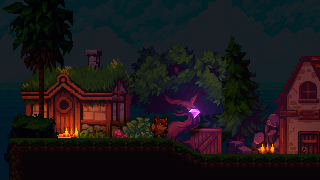
本项目从 2D 平面光线追踪(见参考 123)延伸,引入深度实现 2D 场景内的(伪)3D 光影效果。
基于 Unity 引擎制作,使用 URP 渲染管线。项目源码:https://gitee.com/domehall/unity-2d-lighting
这里不介绍具体的理论方案设计,仅介绍核心要义:追踪光线在二维平面内利用二维有向距离场做光线步进,寻找该方向上的所有光源,每次找到一个光源后就利用深度在伪三维空间中判断光线是否被阻挡。
渲染流程
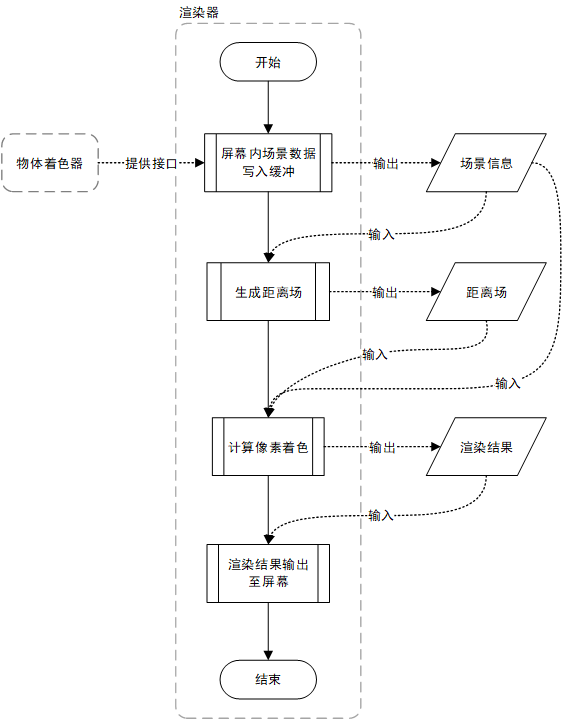
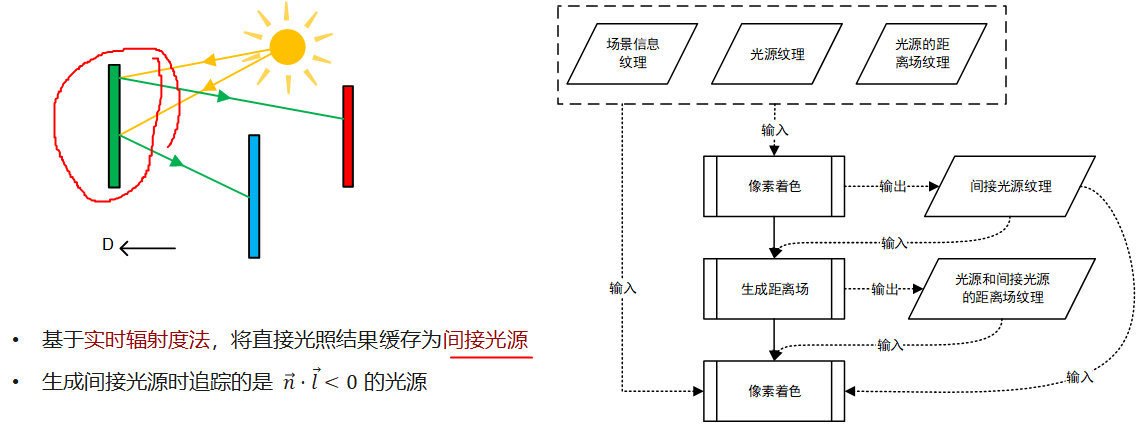
问题来了,间接光(光线弹射)怎么实现?简单粗暴的方法如下:
在 Unity 内实现
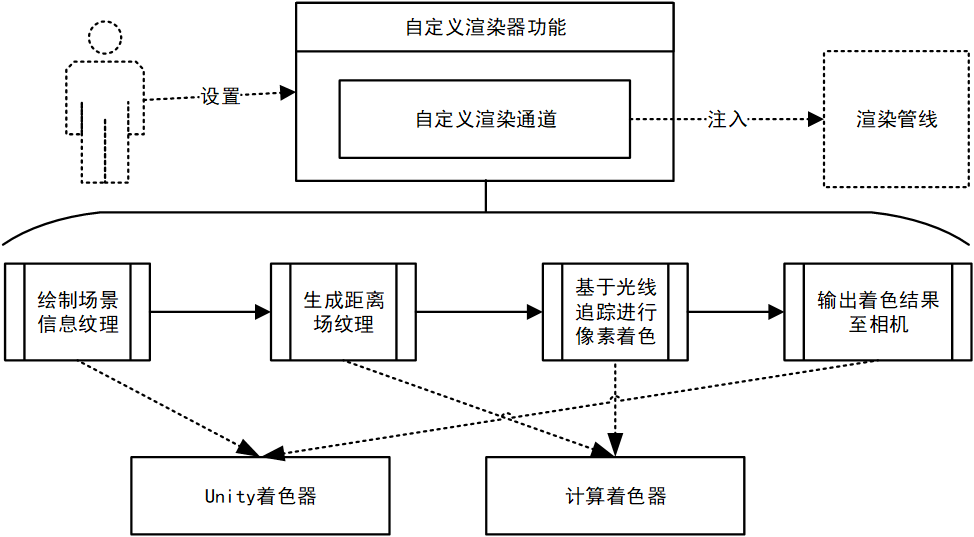
看上去很简单对不对,就是这么简单啦。Renderer Feature 只负责输入参数和注入 Pipeline,Render Pass 只负责管理和绘制 RT(以及其他相机设置之类的细节),所以后文的实施细节大部分都是在 Shader 中的。
用 Compute Shader 的原因是想试试性能会不会更好,顺便练练手。XD
Sprite Shader
目前只需要两个 pass:
- Universal2D:默认的 Sprite.shader 自带,输出原本物体颜色
i.color * texColor; - Depth2D:自定义 pass,输出深度
Depth2D 的 Frag 函数如下:
float Frag(Varyings i) : SV_TARGET
{
    Alpha(SampleAlbedoAlpha(i.uv, TEXTURE2D_ARGS(_MainTex, sampler_MainTex)).a, _Color, _Cutoff);
    return i.positionCS.z; //ndc depth
}
在 Render Pass 内可按照以上两个 Shader Pass 和用户设置的 LayerMask 分别绘制不同的场景信息:
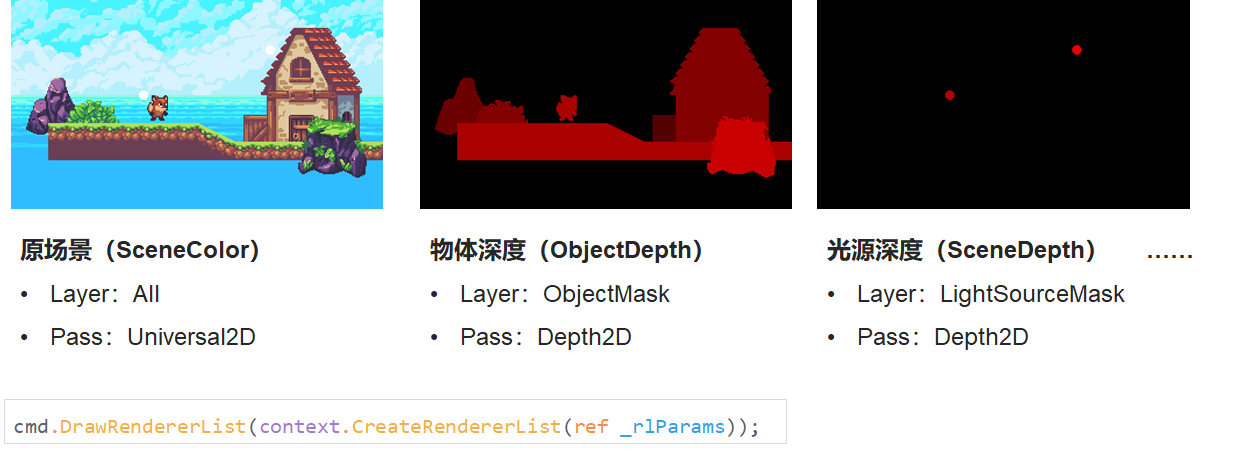
距离场
这里生成的是二维有向距离场。使用 JFA 算法,交替两个 RT 去实时生成距离场。
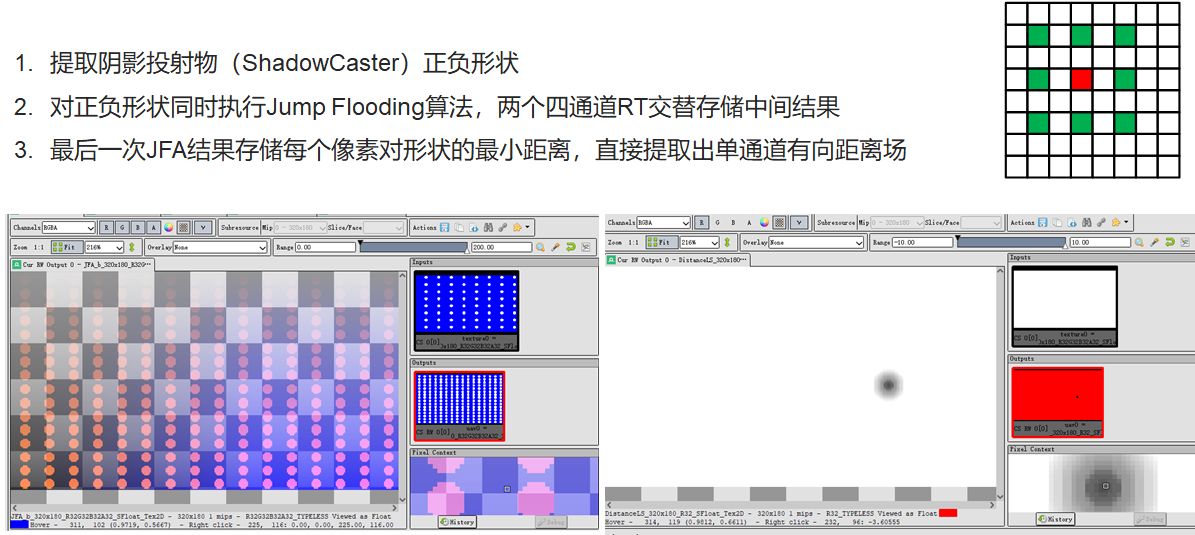
Render Pass:
// in Execute()
CopySeed(_depthLSRT, 0);
JumpFlood();
GetDistanceFromJFA(_distLSRT);

private void CopySeed(RTHandle src, int channel)
{
    // channel: 0, 1, 2, 3 - r, g, b, a
    _owner._compute.GetKernelThreadGroupSizes(_owner._kernelSeed, out uint x, out uint y, out uint z);
    Vector3Int dispatchesNum = new Vector3Int(Mathf.CeilToInt((float)_owner._rtRes.x / x), Mathf.CeilToInt((float)_owner._rtRes.y / y), 1);

    _owner._compute.SetTexture(_owner._kernelSeed, "_InputTex", src);
    _owner._compute.SetTexture(_owner._kernelSeed, "_OutputTex", _jfaRT.From);
    _owner._compute.SetFloat("_Channel", channel);
    _owner._compute.Dispatch(_owner._kernelSeed, dispatchesNum.x, dispatchesNum.y, dispatchesNum.z);
}

private void JumpFlood()
{
    _owner._compute.GetKernelThreadGroupSizes(_owner._kernelJFA, out uint x, out uint y, out uint z);
    Vector3Int dispatchesNum = new Vector3Int(Mathf.CeilToInt((float)_owner._rtRes.x / x), Mathf.CeilToInt((float)_owner._rtRes.y / y), 1);
    Vector2Int step = new Vector2Int(_owner._rtRes.x >> 1, _owner._rtRes.y >> 1);
    do
    {
        _owner._compute.SetVector(s_JFAStepSizeId, (Vector2)step);
        _owner._compute.SetTexture(_owner._kernelJFA, "_InputTex", _jfaRT.From);
        _owner._compute.SetTexture(_owner._kernelJFA, "_OutputTex", _jfaRT.To);
        _owner._compute.Dispatch(_owner._kernelJFA, dispatchesNum.x, dispatchesNum.y, dispatchesNum.z);
        _jfaRT.Flip();
        step = new Vector2Int(step.x >> 1, step.y >> 1);
    } while (step.x > 1 || step.y > 1);
}

private void GetDistanceFromJFA(RTHandle dist)
{
    _owner._compute.GetKernelThreadGroupSizes(_owner._kernelDist, out uint x, out uint y, out uint z);
    Vector3Int dispatchesNum = new Vector3Int(Mathf.CeilToInt((float)_owner._rtRes.x / x), Mathf.CeilToInt((float)_owner._rtRes.y / y), 1);

    _owner._compute.SetTexture(_owner._kernelDist, "_InputTex", _jfaRT.From);
    _owner._compute.SetTexture(_owner._kernelDist, "_OutputTex", dist);
    _owner._compute.Dispatch(_owner._kernelDist, dispatchesNum.x, dispatchesNum.y, dispatchesNum.z);
}
CopySeed 提取形状:
[numthreads(8, 8, 1)] void SeedMain(uint3 id : SV_DispatchThreadID)
{
    float alpha = 0;
    switch ((uint)_Channel)
    {
    case 0:
        alpha = _InputTex[id.xy].r;
        break;
    case 1:
        alpha = _InputTex[id.xy].g;
        break;
    case 2:
        alpha = _InputTex[id.xy].b;
        break;
    case 3:
        alpha = _InputTex[id.xy].a;
        break;
    default:
        break;
    }
    float2 posEx = id.xy * (1 - step(alpha, 0));
    float2 posIn = id.xy * step(alpha, 0);
    _OutputTex[id.xy] = float4(posEx, posIn);
}
JFA:
static int2 directions[] = {
    int2(-1, -1),
    int2(-1, 0),
    int2(-1, 1),
    int2(0, -1),
    int2(0, 1),
    int2(1, -1),
    int2(1, 0),
    int2(1, 1)};

void GetMinDistancePoint(uint2 pos, float4 sample, inout float3 minInfoEx, inout float3 minInfoIn)
{
    if (all(sample.xy))
    {
        float distEx = dot(pos - sample.xy, pos - sample.xy);
        if (distEx < minInfoEx.x)
        {
            minInfoEx.x = distEx;
            minInfoEx.yz = sample.xy;
        }
    }
    if (all(sample.zw))
    {
        float distIn = dot(pos - sample.zw, pos - sample.zw);
        if (distIn < minInfoIn.x)
        {
            minInfoIn.x = distIn;
            minInfoIn.yz = sample.zw;
        }
    }
}

[numthreads(8, 8, 1)] void JFAMain(uint3 id : SV_DispatchThreadID)
{
    // external
    float3 minInfoEx = float3(1e16, 0, 0);
    // internal
    float3 minInfoIn = float3(1e16, 0, 0);

    GetMinDistancePoint(id.xy, _InputTex[id.xy], minInfoEx, minInfoIn);
    GetMinDistancePoint(id.xy, _InputTex[id.xy + directions[0] * _JFAStepSize], minInfoEx, minInfoIn);
    GetMinDistancePoint(id.xy, _InputTex[id.xy + directions[1] * _JFAStepSize], minInfoEx, minInfoIn);
    GetMinDistancePoint(id.xy, _InputTex[id.xy + directions[2] * _JFAStepSize], minInfoEx, minInfoIn);
    GetMinDistancePoint(id.xy, _InputTex[id.xy + directions[3] * _JFAStepSize], minInfoEx, minInfoIn);
    GetMinDistancePoint(id.xy, _InputTex[id.xy + directions[4] * _JFAStepSize], minInfoEx, minInfoIn);
    GetMinDistancePoint(id.xy, _InputTex[id.xy + directions[5] * _JFAStepSize], minInfoEx, minInfoIn);
    GetMinDistancePoint(id.xy, _InputTex[id.xy + directions[6] * _JFAStepSize], minInfoEx, minInfoIn);
    GetMinDistancePoint(id.xy, _InputTex[id.xy + directions[7] * _JFAStepSize], minInfoEx, minInfoIn);

    _OutputTex[id.xy] = float4(minInfoEx.yz, minInfoIn.yz);
}
GetDistance:
[numthreads(8, 8, 1)] void DistMain(uint3 id : SV_DispatchThreadID)
{
    float4 minDistPos = _InputTex[id.xy];
    float distEx = length(id.xy - minDistPos.xy);
    float distIn = length(id.xy - minDistPos.zw);
    _OutputTex[id.xy] = float4(distEx - distIn, 0, 0, 1);
}
光线追踪
步进
// in Trace()
stepLength = GetStepLengthLS(rayPos, stepLength);
rayPos += dir * stepLength;

float GetStepLengthLS(const in float2 pos, const in float lastStepLength)
{
    if (lastStepLength < MINSTEPLENGTH)
        return MINSTEPLENGTH;
    return abs(_LSDistTex[pos]);
}
与光源的相交测试
// in Trace()
const float4 ls = _LightColorTex[rayPos];
if (ls.w > 0)
{
    const float lsDepth = _LSDepthTex[rayPos];
    if (lsDepth - pixelDepth > 0)
    {
        float rayLength2DSquare = dot(pixelPos - rayPos, pixelPos - rayPos);
        float rayLength2D = sqrt(rayLength2DSquare);
        float rayLength = sqrt(rayLength2DSquare + dot(lsDepth - pixelDepth, lsDepth - pixelDepth) * _DepthScale * _DepthScale);
        if (!Shadowed(pixelPos, dir, pixelDepth, lsDepth, rayLength2D))
        {
            lsLight += ls.xyz * ls.w * _LSIntensityMax * Falloff(rayLength, _RMax);
        }
    }
}

bool Shadowed(const in float2 pixelPos, const in float2 dir, const in float pixelDepth, const in float lightDepth, const in float rayLength2D)
{
    float2 shadowRayPos = pixelPos;
    float stepLength = rayLength2D / _ShadowRayStepsNum;
    float blockDepth = pixelDepth;
    for (int n = 0; n < (int)_ShadowRayStepsNum; n++)
    {
        shadowRayPos += dir * stepLength;
        blockDepth = pixelDepth + (lightDepth - pixelDepth) * length(pixelPos - shadowRayPos) / rayLength2D;
        const float depth = _SCDepthTex[shadowRayPos];
        if (depth < blockDepth && depth > blockDepth - EPSILON && depth > lightDepth)
            return true;
    }
    return false;
}
关于阴影遮挡判断函数Shadowed():
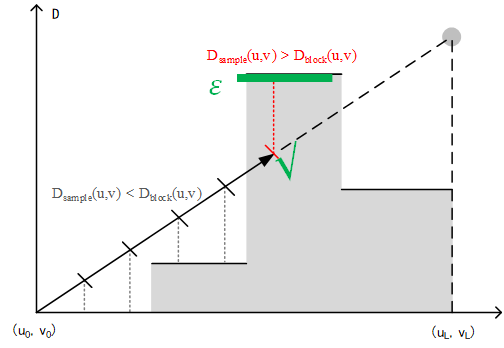
- 最大步数:用户输入的固定值
_ShadowRayStepsNum - 步长:
step = rayLength2D / _ShadowRayStepsNum - 𝑫_𝒃𝒍𝒐𝒄𝒌 :
blockDepth = pixelDepth + (lightDepth - pixelDepth) * length(pixelPos - shadowRayPos) / rayLength2D - 被阻挡条件:
depth > blockDepth && depth < blockDepth + EPSILON && depth < lightDepth
像素颜色的统计采样
抖动分层采样 + 简单算术平均 + 简单的兰伯特漫反射模型(这里环境光改成与反照率相乘)。
for (int i = 0; i < _RaysNum; i++)
{
    const float t = (float(i) + rand) / _RaysNum * float(PI) * 2;
    traceResult += Trace(id.xy, float2(cos(t), sin(t)), depth);
}
traceResult /= _RaysNum;
result = color.xyz * (traceResult + _Ambient);
你可能会想问光源和天空背景怎么办——当然是在光追前加一个分类处理啦。只不过我这里写得很拧巴,将就看:
if (lsDepth - depth > 0 && lsDepth - scDepth > 0)
{
    // Light Source
    result = lerp(color.xyz * _Ambient, lsColor.xyz * _LSIntensityMax * Falloff((1 - lsDepth) * _DepthScale, _RMax), Falloff((1 - lsDepth) * _DepthScale, _RMax)*Falloff((1 - lsDepth) * _DepthScale, _RMax));
}
else if (depth <= 0 || depth > 0 && depth < scDepth)
{
    result = color.xyz * _Ambient;
}
else
{
    //Ray Tracing...
}
剩下的“把着色完毕的 RT blit 到相机”的步骤就不说了。
测试
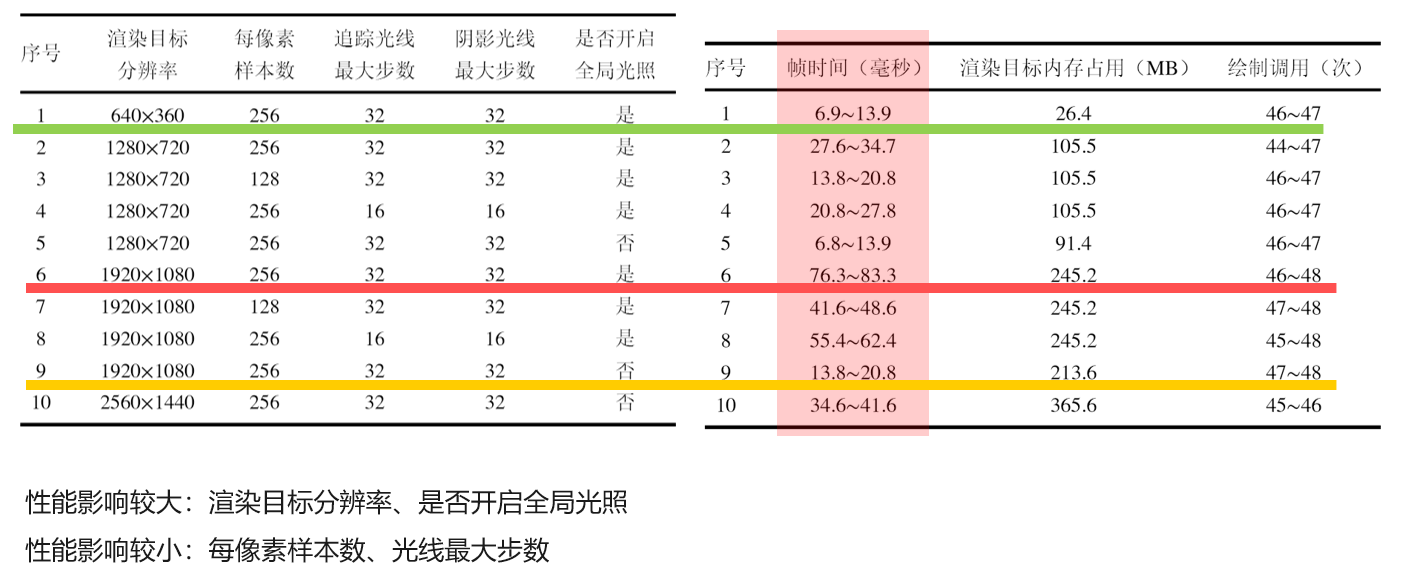
测试方法:打包后使用 Profiler 监测数据。
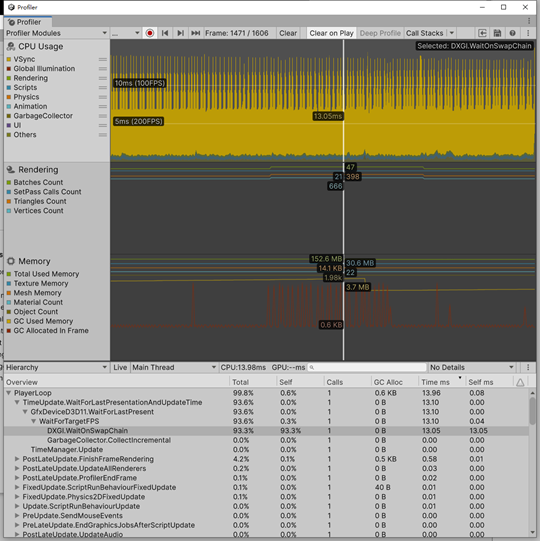
测试用例与结果如下:
赛后总结
其实感觉没多大用(笑死)。性能是一般中的一般,间接光效果也不好,没发挥出光追的优势,所以待优化吧。
参考
- NullTale - GiLight2D: https://github.com/NullTale/GiLight2D
- MiloYip - light2D:https://github.com/miloyip/light2d
- Jarosz - Theory, analysis and applications of 2d global illumination:https://cs.dartmouth.edu/~wjarosz/publications/jarosz12theory.html
- 各种涉及实时渲染和光线追踪的经典教材